


Quick Answer: To add a WhatsApp button, create a page on La.Bio and click 'Add Link or Content'. Choose 'WhatsApp Message' to start a chat or 'WhatsApp Call' for direct calls. Enter your phone number, add a label, and click save. Your visitors can now contact you in one tap.
We have all been there. You see a business you like on Instagram or TikTok, and you want to ask a quick question. But instead of a simple chat button, you find a static phone number typed out in their bio text.
To contact them, you have to memorize the number, close the app, open your dialer, type it in manually, save it as a contact, and finally open WhatsApp to say "Hello."
Let’s be honest: most users give up halfway through.
As a small business or creator, this friction costs you leads every single day. The modern consumer expects instant communication. They want a whatsapp click to chat experience, not a memory test.
The solution is simple: a direct button in your link-in-bio that opens the WhatsApp app automatically. While creating these links manually can involve tricky API codes, La.Bio handles the complex coding for you automatically and for free. By using our whatsapp link generator tools, you can turn passive profile visitors into active customers in seconds.
WhatsApp Call vs WhatsApp Message - Which one to choose
Before you add a button to your page, it is important to understand how you want your customers to contact you. La.Bio offers two distinct widgets, and choosing the right one depends on your business goals.
WhatsApp Call.
This widget is designed for immediate action. When a visitor clicks this button, it triggers a voice call through WhatsApp right away.
Best for: Urgent matters, such as restaurant table reservations, emergency support, or time-sensitive consultations.
The Experience: It skips the typing and connects you voice-to-voice instantly.
WhatsApp Message.
This is the most popular option for creators and online stores. When clicked, it opens a specific text chat window with your number.
Best for: Sales inquiries, lead generation, and general customer service.
The Experience: It is less intrusive than a call. Plus, it allows you to set a pre-filled message, making it incredibly easy for the user to start the conversation without feeling awkward about what to say.
Step by Step - Creating Your WhatsApp Link
Adding these communication tools to your page is straightforward. Follow this guide to set up your whatsapp link in bio in just a few minutes.
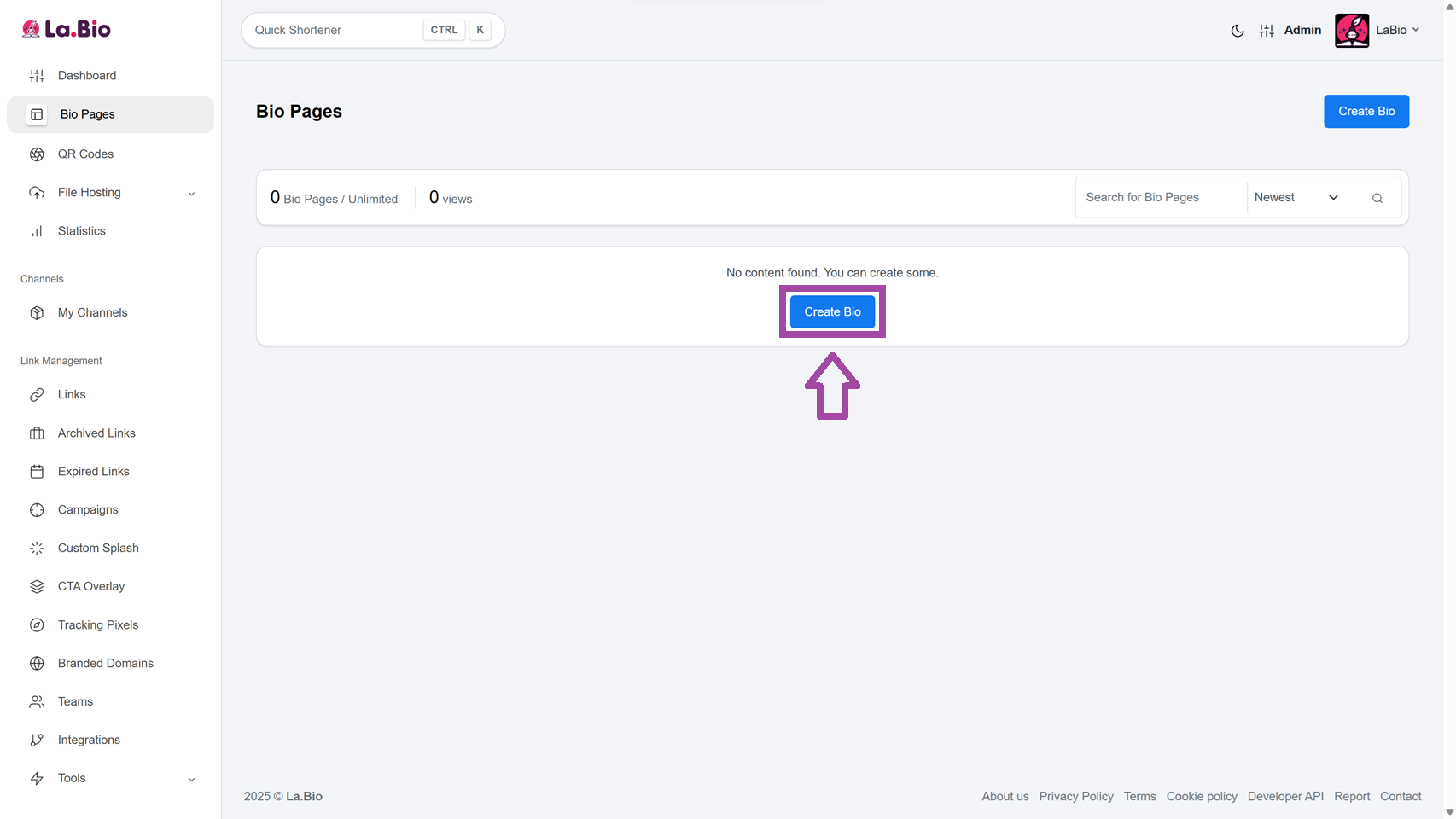
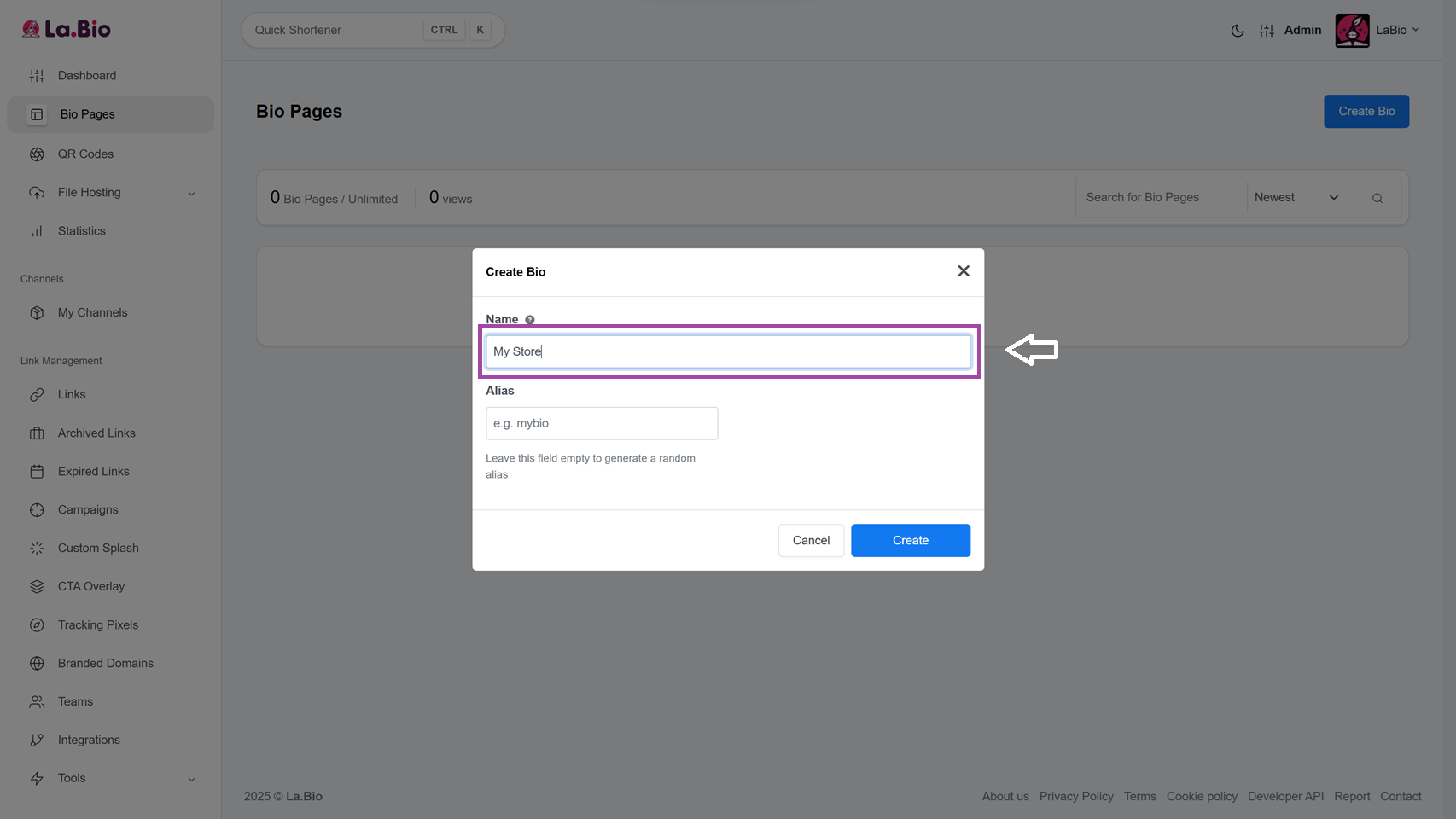
Step 1: Log in to your La.Bio dashboard and click on the "Create Bio" button to start a new project.
Step 2: Choose a clear name and a custom URL slug for your Biolink page (e.g., la.bio/yourbrand).
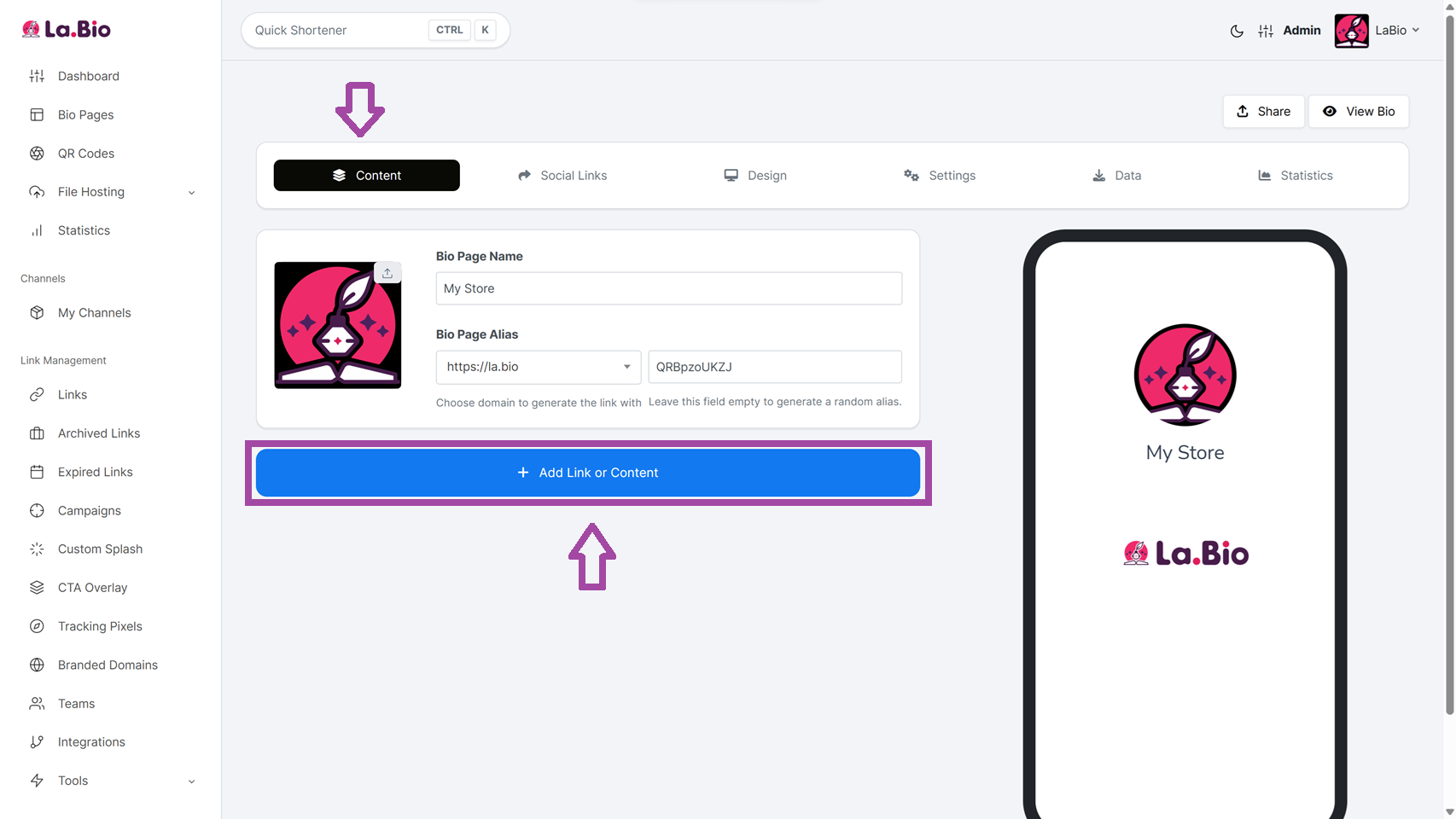
Step 3: Once your page is created, navigate to the "Content" tab. Click the purple "Add Link or Content" button to open the blocks menu.
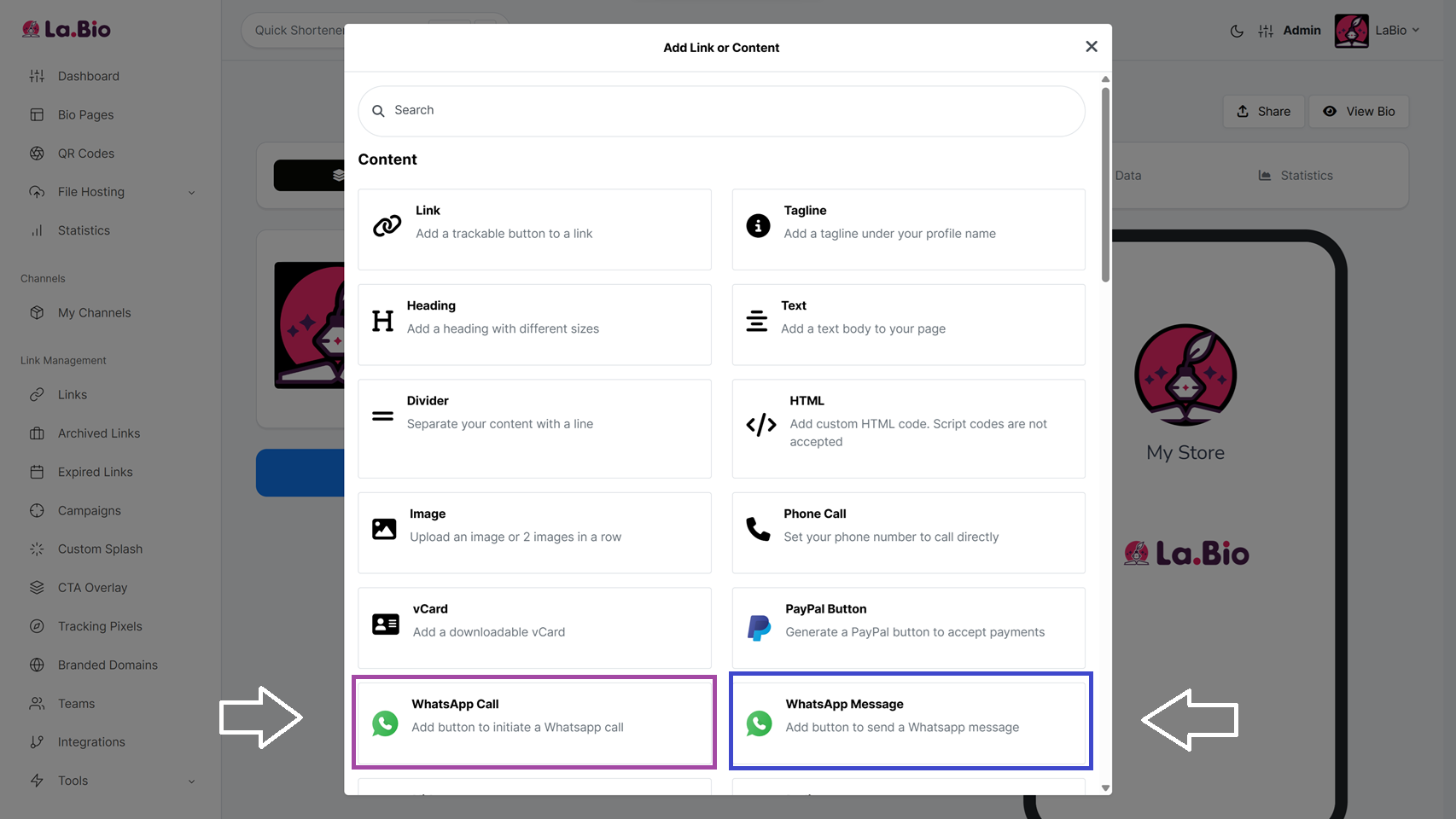
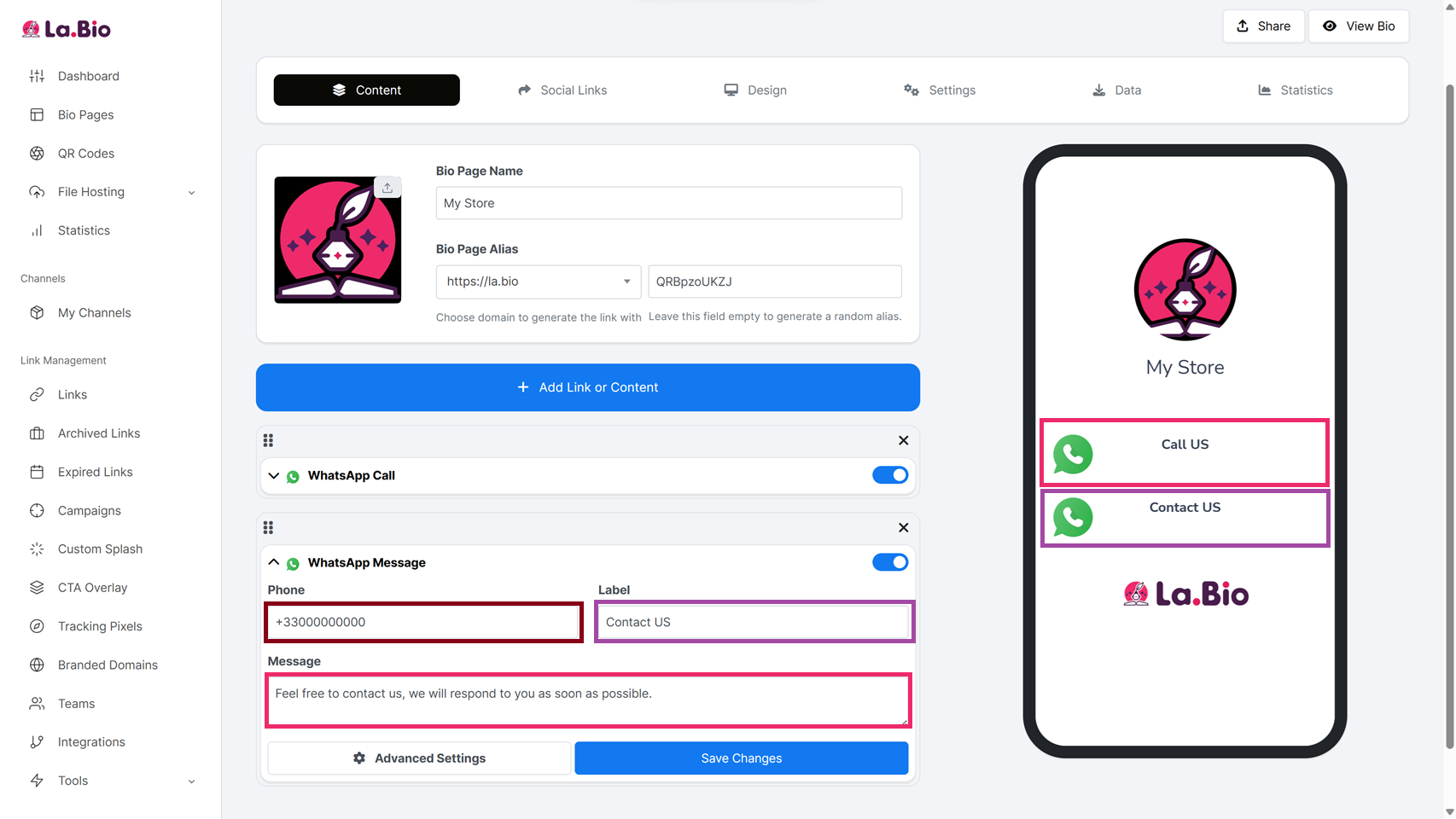
Step 4: Choose your widget. Scroll down the list, and you will see two distinct options: "WhatsApp Call" and "WhatsApp Message".
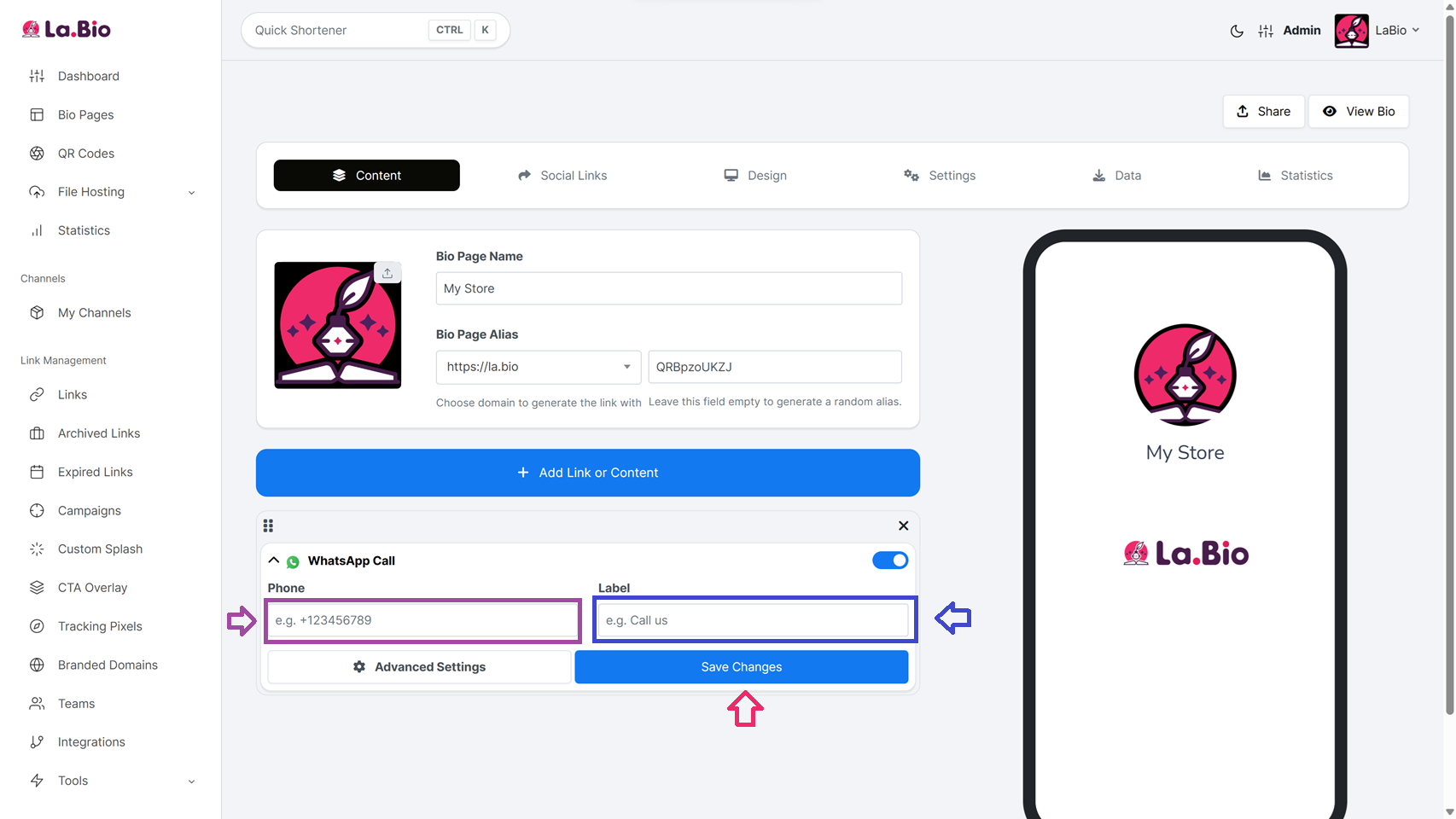
Here is how to configure each one:
Option A - Setting up WhatsApp Call
Select this block if you want visitors to ring your phone immediately.
Phone: Enter your mobile number. Important: You must use the international format without the plus sign or zeros. For example, if your number is in the US, type it like 15551234567.
Label: Type the text you want to appear on the button, such as "Call Support" or "Book a Table".
Click "Save Changes".
Option B - Setting up WhatsApp Message - Recommended for Leads
Select "WhatsApp Message" from the block list if you want to start a text conversation.
Phone: Enter your number using the same international format (e.g., 15551234567).
Label: Enter a call-to-action for your button, like "Chat on WhatsApp" or "Place an Order".
Message: This is the most crucial feature. Fill in this field with a pre-written text that will automatically appear in the user's input bar. For example: "Hi, I would like to order." This removes friction and encourages the user to hit send immediately without having to type.
Click "Save Changes".
Best Use Cases for WhatsApp in Bio
Not every business operates the same way. Knowing when to use a call button versus a message button can significantly impact your conversion rates. Here is how different industries should use these tools on La.Bio:
E-commerce Stores.
If you sell physical products, the WhatsApp Message widget is your best friend. Customers often have quick questions about shipping or sizing before they buy.
Strategy: Set the pre-filled text to something specific like "Hi, I have a question about my order." This helps you filter inquiries instantly.
Restaurants and Service Providers.
For businesses like salons, clinics, or restaurants, timing is everything. A hungry customer or a client in pain does not want to chat back and forth; they want an appointment now.
Strategy: Use the WhatsApp Call widget. It removes the delay of texting and allows for immediate booking confirmations.
Professionals and Freelancers.
If you are a professional, you might also want to share your email, website, and portfolio along with your WhatsApp contact. Instead of just a chat link, you can create a digital business card that houses all your contact details in one downloadable file, ensuring your clients never lose your information.
Frequently Asked Questions
Q. Do I need to include the plus sign in my phone number?
No. When filling out the Phone field on La.Bio, you should generally exclude the plus sign (+), hyphens, or parentheses. Simply enter the country code followed by the phone number directly. For example, if your number is from the US, you would type 15551234567.
Q. Can I use both widgets on the same page?
Yes, absolutely. You are not limited to just one contact method. You can add a WhatsApp Call block for urgent matters and a WhatsApp Message block for general inquiries on the same bio link page. This gives your visitors the freedom to choose how they prefer to communicate with you.
Conclusion
In the competitive world of social media marketing, friction is the enemy of conversion. Every extra second a user spends trying to copy and paste a phone number is a second they might decide to go to a competitor.
By using La.Bio to create a direct click to chat experience, you are not just adding a button; you are opening a door for real relationships. Whether you choose to accept direct calls or start text conversations with a pre-filled message, the goal remains the same: make it effortless for people to talk to you, and you will sell more.
Ready to boost your messages? Add a Free WhatsApp Button to your bio now.







