


Quick Answer: To shorten an Amazon link, copy the product URL and paste it into the "Shorten Link" field on the La.Bio dashboard. Click the "Advanced Options" icon to add password protection or tracking pixels. Click "Shorten" to get a clean, shareable link instantly.
If you have ever tried to share a specific product from Amazon directly to social media, you have likely encountered the same frustration: the link is enormous.
Standard Amazon product links are notoriously long, filled with tracking parameters and random characters that can easily span three lines of text. When you are trying to craft the perfect tweet or keep your YouTube description tidy, these "ugly" URLs take up valuable character space and ruin the aesthetic of your content.
However, the problem goes beyond just aesthetics. Long, messy URLs look suspicious. In an era where online security is a top priority, your audience is far less likely to click on a link that looks like spam or a potential phishing attempt. If your link looks risky, you lose the click—and the potential commission.
The solution is simple: you need a dedicated shortener to make your links clean, trustworthy, and trackable. In this guide, we will show you how to use [La.Bio] to transform those unwieldy Amazon URLs into professional, branded links. Unlike other tools that charge for basic utility, [La.Bio] allows you to shorten links for free while giving you access to premium features like Password Protection and Geo Targeting.
Why You Must Shorten Your Amazon Affiliate Links

As an affiliate marketer or content creator, your primary goal is to get people to click. However, pasting a raw Amazon link is often the quickest way to lower your conversion rate. Here is why using a specialized amazon affiliate link shortener like [La.Bio] is essential for your strategy:
Instant Trust and Professionalism
First impressions matter. A raw Amazon link is often 100+ characters long and filled with intimidating code. To the average user, this looks messy at best and malicious at worst. By switching to a clean Amazon URL, you signal to your audience that you are professional. A short, concise link reduces "click fear" and significantly boosts your Click-Through Rate (CTR).Real-Time Analytics
While the Amazon Associates dashboard provides data, it is notoriously slow. You often have to wait 24 hours to see how your links are performing. [La.Bio] bridges this gap by giving you real-time click statistics. You can track amazon clicks the moment they happen, allowing you to instantly see which tweet, story, or video description is driving the most traffic.Revenue Optimization with Geo Targeting
This is the secret weapon for top-tier affiliates. If you share a link to Amazon.com (US), but a follower from the UK clicks it, they might land on a product they cannot buy. This results in a lost commission.
[La.Bio] offers advanced Geo Targeting capabilities. You can configure a single link to detect the visitor's location and redirect them to their local Amazon store (e.g., sending a French user to Amazon.fr). This ensures you capture sales from a global audience rather than just one region.
Step by Step - Creating Your Amazon Short Link
Now that you understand the benefits, let’s set up your first link. Follow these exact steps to ensure you are maximizing the potential of the [La.Bio] interface.
Step 1: Choose Your Method
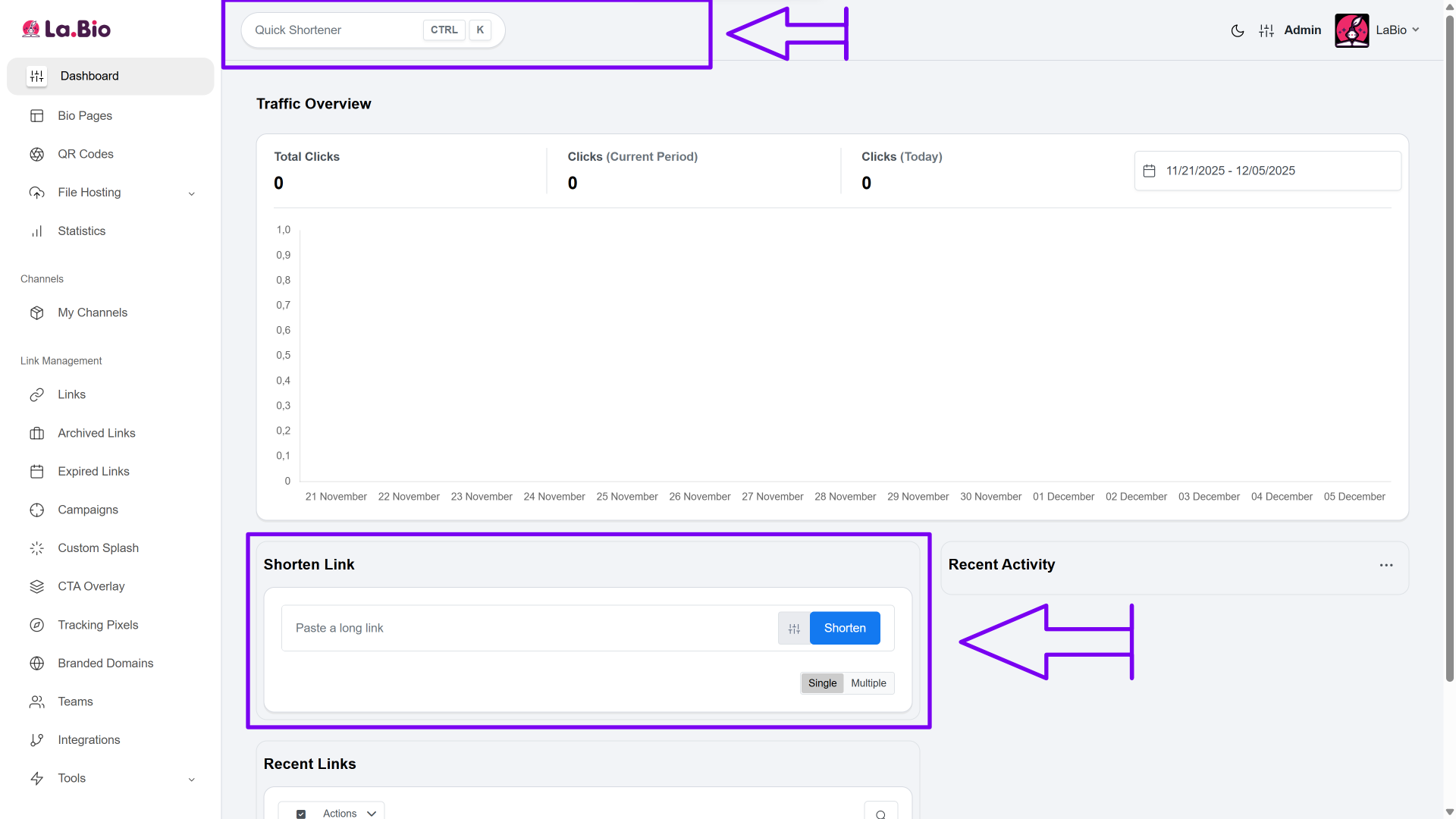
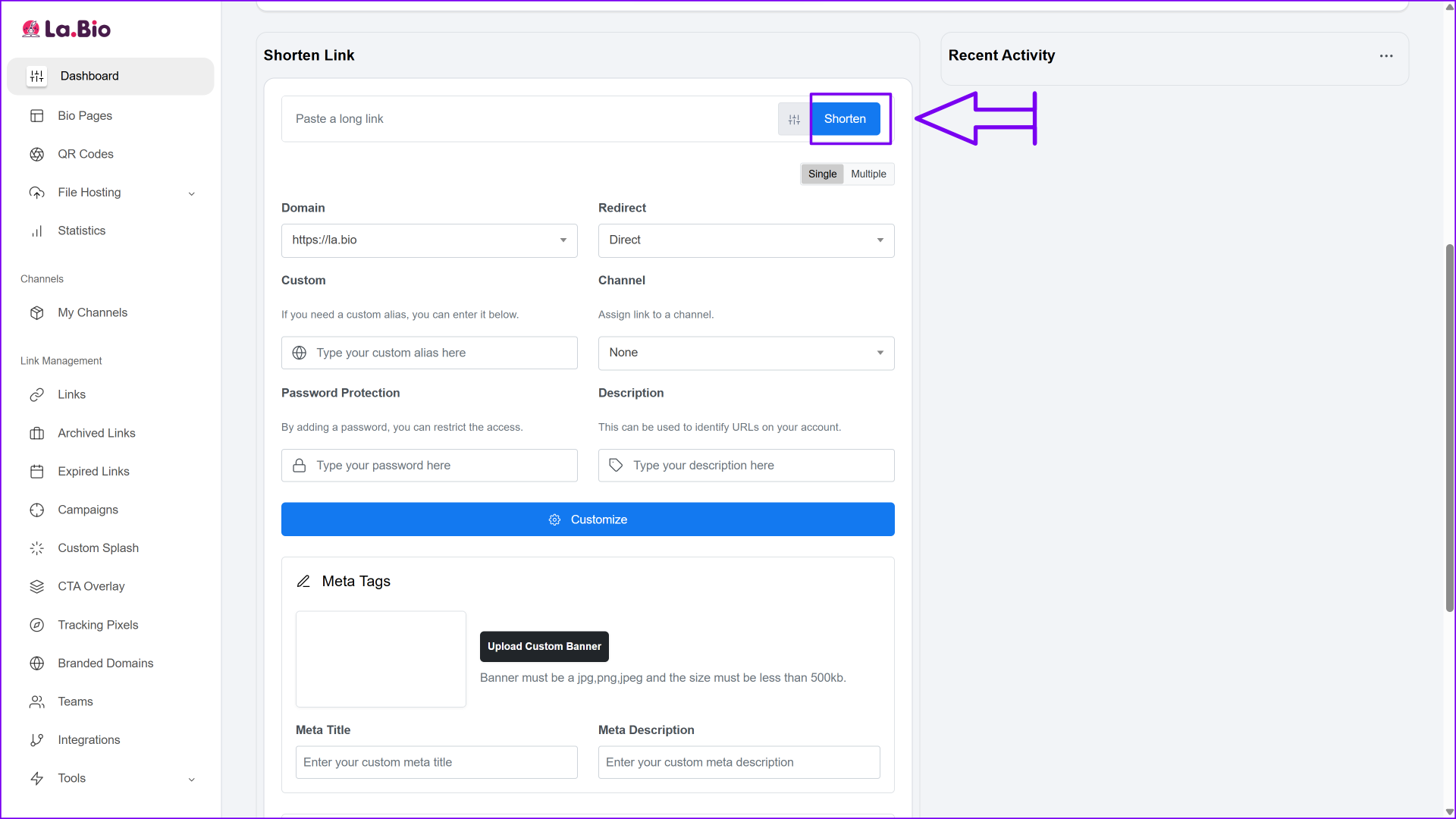
Log in to your account. You will notice two ways to shorten a link: the "Quick Shortener" bar at the very top of the page (best for speed) and the detailed "Shorten Link" card further down the dashboard.
Recommendation: We strongly advise using the Dashboard card option for this tutorial, as it gives you the control needed to add tracking and security.
Step 2: Open Advanced Settings
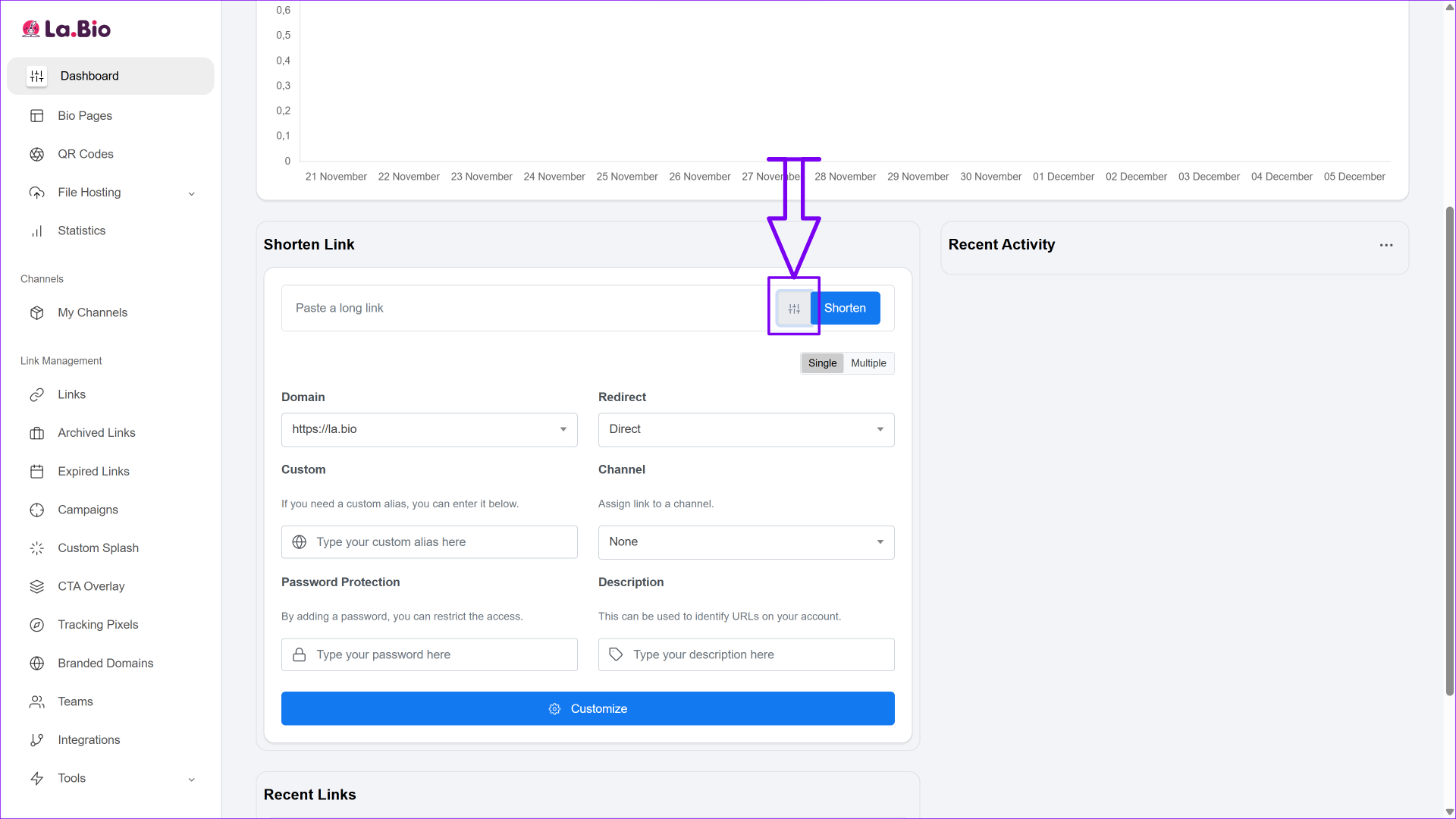
Before pasting your link, look for the "Advanced Options" icon located directly next to the shorten button (it looks like a small set of sliders or settings toggles).
Click this icon. It is easy to miss, but this simple click opens the settings panel that separates [La.Bio] from basic shorteners.
Step 3: Input Your URL
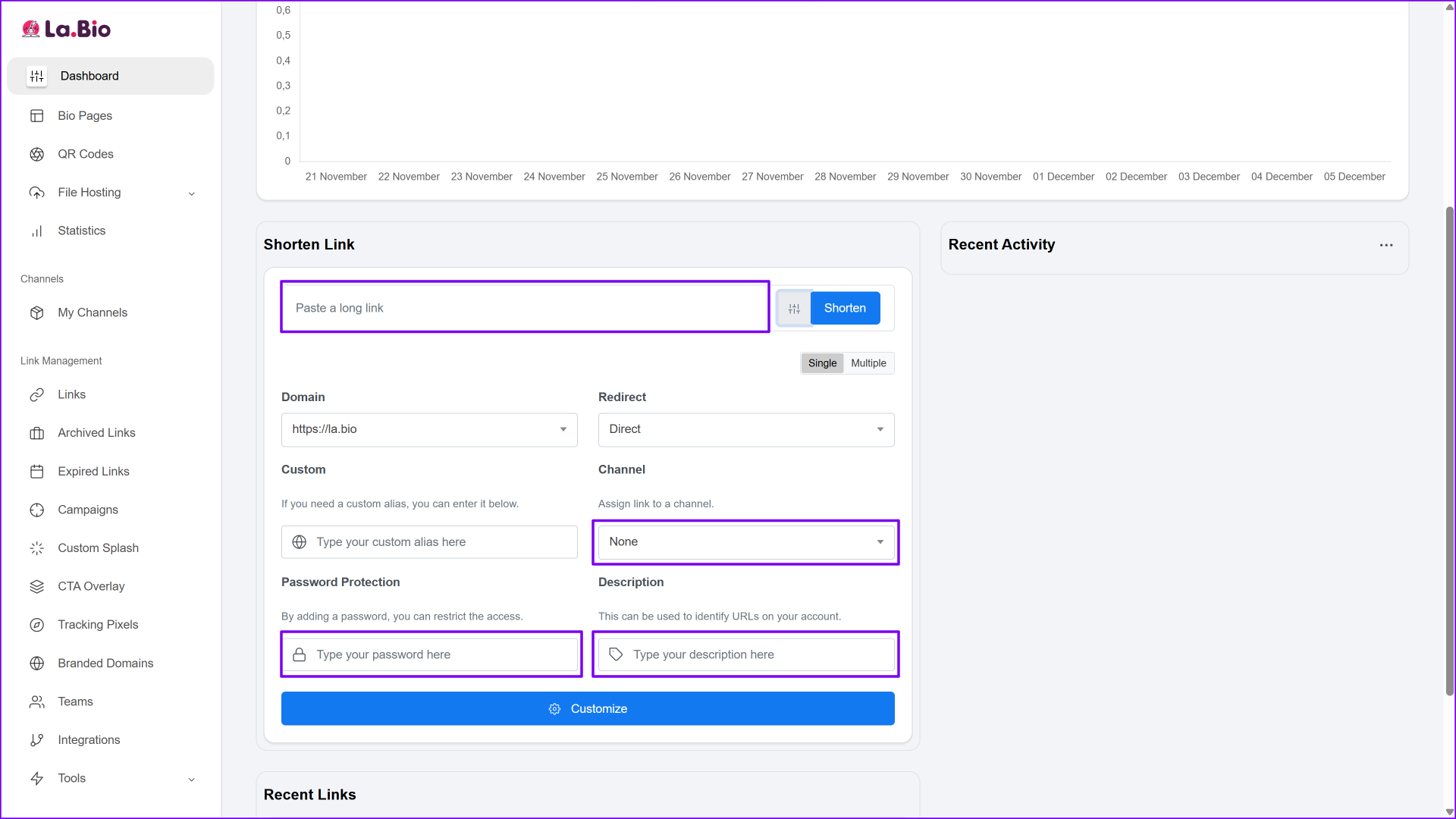
Copy your long, complex Amazon product URL and paste it into the main input field, and take a moment to fill in the data fields to keep your campaigns organized:
Channel: Select a channel to categorize your links (e.g., "Tech Gear" or "Twitter Promo").
Password Protection: Enter a password here if you want to restrict access to the link. This is a rare free feature that is perfect for sharing exclusive deals with VIP subscribers.
Description: Add a quick note for yourself so you can identify the link later in your analytics.
(Note: Custom Alias and Custom Domains are reserved for Premium users).
Step 4: Add Customization
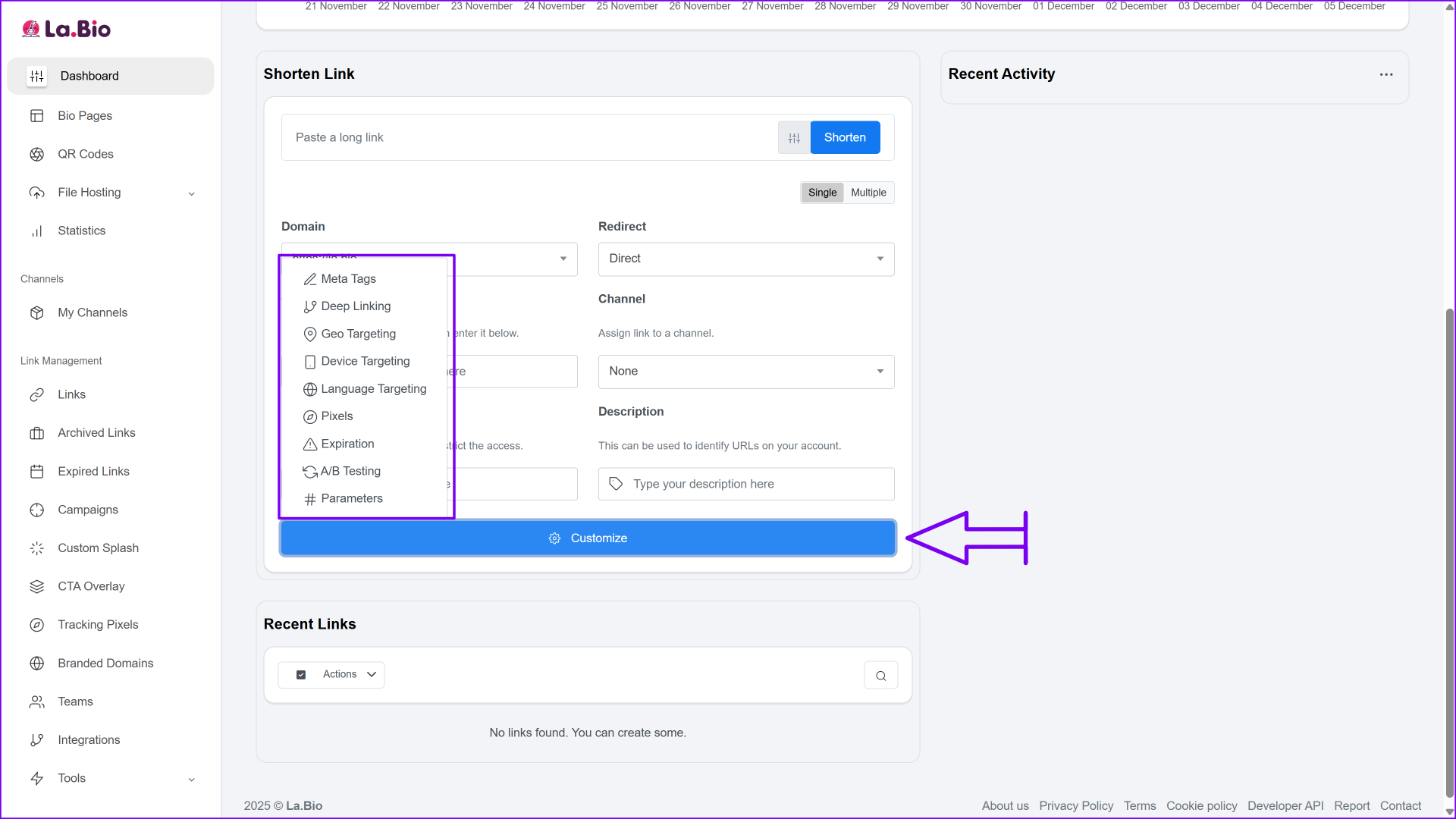
Click the blue "Customize" bar at the bottom of the card. This is where the magic happens! In this section, you can configure Geo Targeting (automatically redirecting users to the correct Amazon store based on their country) or add Tracking Pixels to build retargeting audiences on platforms like Facebook or Google.
Step 5: Generate Your Link
Click the blue "Shorten" button. Your long Amazon URL is now a clean, professional short link. Copy your new URL and it is ready to be shared immediately!
Advanced Tips for Affiliates
Shortening a single link is powerful, but top-tier affiliates use [La.Bio] to build entire ecosystems for their products. Here is how to take your strategy to the next level:
Master the "Bio Page" Feature
Social media platforms like Instagram and TikTok often limit you to just one clickable link in your profile. If you are promoting a camera, a microphone, and a lighting setup, choosing just one product link means losing sales on the others.
Instead of choosing, use the [La.Bio] Bio Page feature. This allows you to create a stunning, mobile-optimized landing page where you can list all your favorite Amazon products in one place. You share one URL, but your audience gets access to your entire catalog.Streamline Your Gear List
This feature is particularly effective for influencers who frequently get asked about their equipment. Rather than answering "What headset is that?" in the comments every day, you can direct your audience to a single curated list.
For example, if you are a streamer promoting gear, put this short link in your link in bio for gamers to showcase your full streaming setup—from your mouse to your monitor—generating commissions on every piece of hardware you own.
Frequently Asked Questions
Q: Is using a URL shortener allowed by Amazon?
A: Yes, Amazon Associates allows the use of shortened URLs, provided that you remain transparent. According to Amazon’s Operating Agreement, you must not use a link shortener to obscure or hide the fact that you are linking to Amazon. As long as you clearly state that the link is an affiliate link (e.g., using "ad" or "commission earned" in your post) and comply with their disclosure guidelines, you can safely use url shorteners for amazon.
Q: Do the short links generated on [La.Bio] expire?
A: No. Unlike some services that delete free links after a certain period of inactivity, links created on [La.Bio] are unlimited and do not have an expiration date. Your content will remain functional permanently, ensuring you don't lose commissions on older posts.
Q: Can I track how many people click my Amazon link?
A: Absolutely. This is a key advantage over using raw links. By using the Advanced Options during creation, you gain access to a dashboard that shows exactly how many clicks you received, where the visitors came from, and which device they used.
Conclusion
The difference between a successful affiliate campaign and a mediocre one often comes down to the details. Long, ugly Amazon links clutter your content, waste valuable character limits, and look unprofessional to your audience.
By switching to [La.Bio], you solve these problems instantly. You get clean, trustworthy links that are aesthetically pleasing and packed with powerful features like Geo Targeting and real-time tracking.
Ready to boost your affiliate sales? Shorten your Amazon Links for Free now.








