


Quick Answer: To collect emails from Instagram, create a page on La.Bio and click "Add Link or Content". Select the "Newsletter" widget. Fill in the "Text" field with your call-to-action, add a description, and include a disclaimer for privacy compliance. Click save, and your followers can now subscribe directly from your bio.
The Reality Check: Do you actually own your audience?
It is a question every content creator, coach, and small business owner needs to ask themselves. You might have 10,000 followers on Instagram or 50,000 on TikTok, but you are playing in a rented playground. If the algorithm changes tomorrow, your reach could drop to zero. Worse yet, if your account is flagged or banned by mistake, your entire business could evaporate overnight. Relying solely on social media is a high-risk strategy.
The Asset: The only thing you truly own is your email list.
Unlike social media followers, an email list is an asset that belongs to you. No algorithm stands between you and your subscribers. When you send an email, it lands directly in their inbox. It is the most reliable way to secure your income, announce new product launches, and build a relationship that survives the rise and fall of social platforms.
The Opportunity: Turn your Bio Link into a Lead Capture Machine.
You don't need a complex, expensive website to start building your list. You can start right now using the free Newsletter widget on La.Bio. This tool transforms your standard Link in Bio into a powerful lead generation engine, allowing followers to type their email address directly without leaving your page. It’s fast, seamless, and completely compliant with data privacy laws.
Why You Need a Newsletter Sign-up in Your Bio
Social media is fantastic for discovery, but it is terrible for retention. If you are serious about monetizing your content or growing your coaching business, you need to move your followers from a "rented" platform to an "owned" channel. Here is why adding a newsletter signup link in bio is the most strategic move you can make:
Direct Access to Your Audience
When you post on Instagram or TikTok, you are at the mercy of the algorithm. You might reach 20% of your audience, or you might reach 2%. With email, you have a direct line of communication. Your message bypasses the noise of the newsfeed and waits patiently in their inbox until they are ready to read it. You control the timing and the narrative.Higher Conversion Rates
Marketing data consistently shows that email outperforms social media when it comes to sales. Social media is a passive browsing experience, whereas checking email is often a task-oriented behavior. A subscriber who voluntarily gives you their email address is a "warm lead"—they have already raised their hand and said, "I am interested in what you have to offer." These are the people most likely to buy your courses, products, or services.Trust and Legal Compliance
Sliding into DMs to pitch your services can feel spammy and intrusive. It can also violate privacy expectations. By using the Newsletter widget on La.Bio, you are building a list based on consent. Because the widget allows for an explicit opt-in (especially when you use the Disclaimer field), you ensure you are compliant with regulations like GDPR. This builds trust from day one: your audience knows exactly what they are signing up for, and they are choosing to hear from you.
Step by Step: Setting Up the Newsletter Widget
Setting up your email capture form is incredibly simple. You don't need to be a developer or hire a tech team. Follow these exact steps to add a professional newsletter signup form to your bio in under two minutes.
Step 1: Access the Builder
Log in to your [La.Bio] account and open the Bio Page builder for the specific page you want to edit.
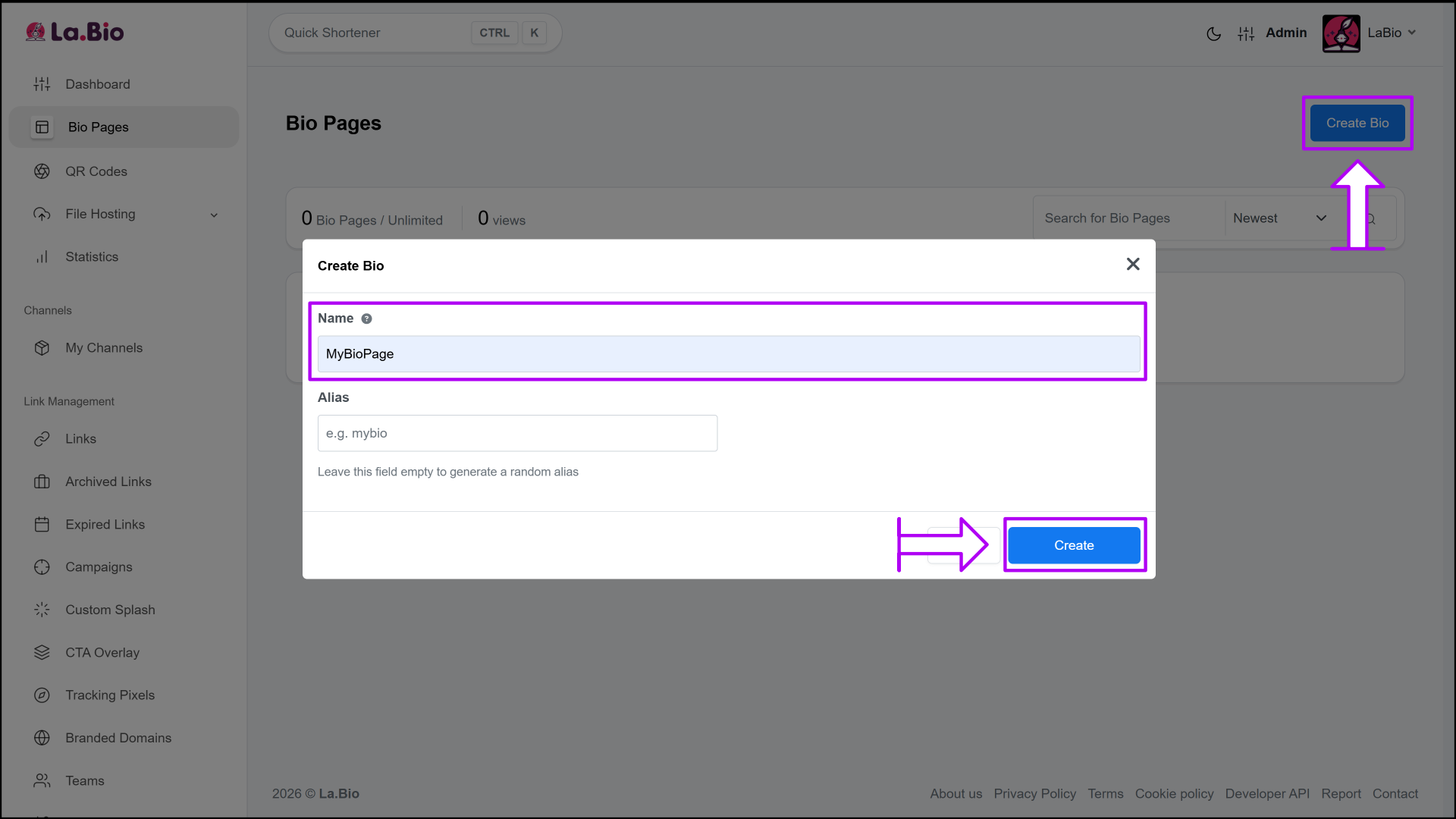
Step 2: Add Content
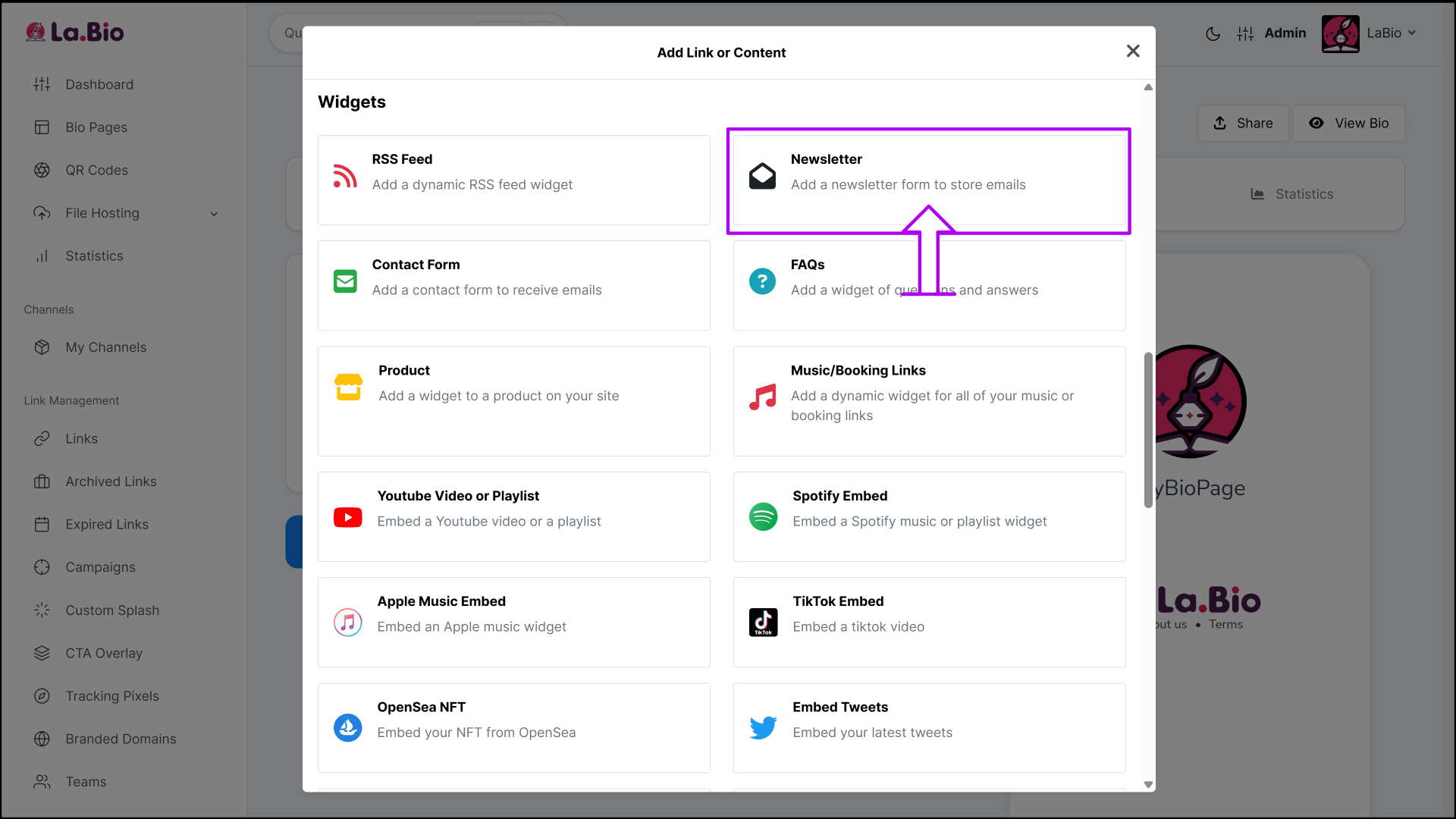
Look for the blue button labeled "Add Link or Content". Click it to open the menu of available blocks.
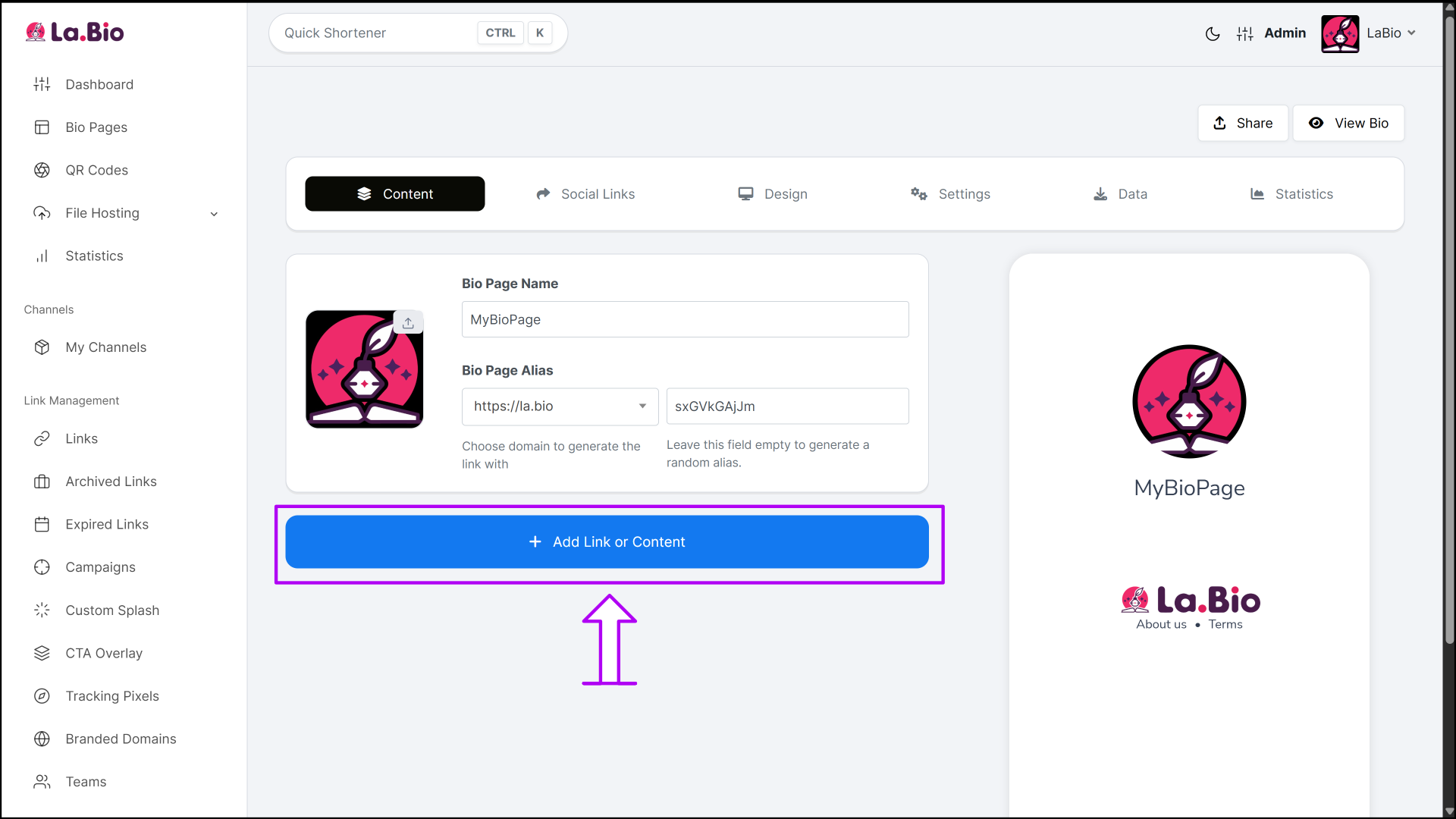
Step 3: Select the Widget
Scroll through the list of content blocks and select the "Newsletter" widget. This will open the configuration panel.
Step 4: Configure the Form Fields
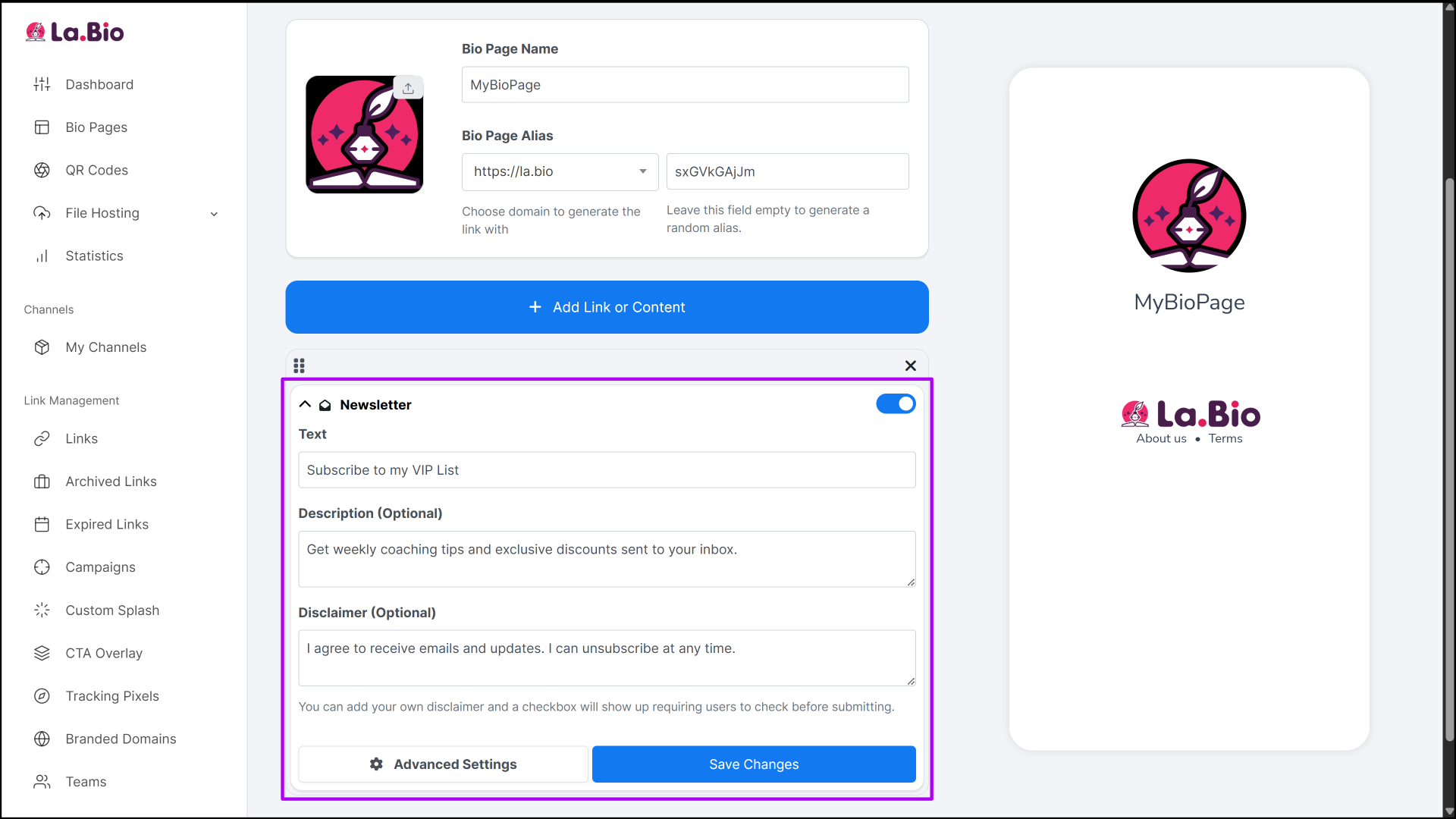
This is where you customize how the form looks to your visitors. Fill in the following fields:
Text (Call-to-Action): This is the main headline of your form. Be clear and compelling. Instead of just "Sign Up," try something like "Subscribe to my VIP List" or "Join the Inner Circle".
Description (Optional): Use this space to explain the value your subscriber will get. Why should they give you their email? Example: "Get weekly coaching tips and exclusive discounts sent to your inbox."
Disclaimer (Optional but Recommended): This field is critical for trust and legal safety. Text added here will appear next to a checkbox that users must tick to submit the form. Use this for GDPR or privacy notices, such as: "I agree to receive emails and updates. I can unsubscribe at any time."
Step 5: Accessing Your Data
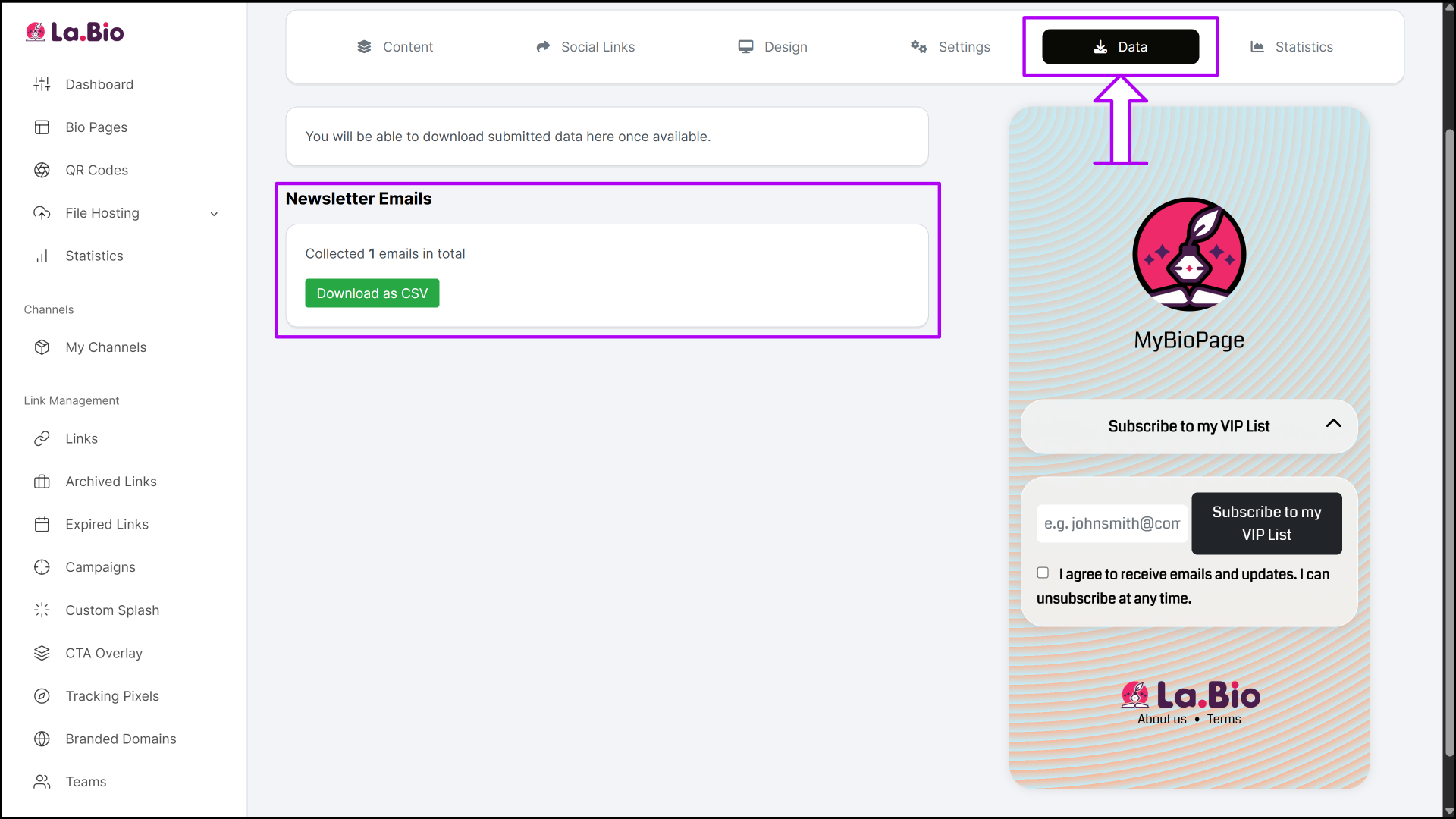
To retrieve the emails you have collected, go to your dashboard and navigate to Bio Pages. Click on the Edit button for your specific page, then select the Data tab. From there, you will be able to view your subscriber list and download the newsletter data as a CSV file to import into your email software (like Mailchimp, Typeform, or Brevo).
Strategy: The "Lead Magnet" Technique
If you simply ask people to "Sign up for my newsletter," most will scroll past. Our inboxes are already full. To skyrocket your conversion rate, you need to offer value in exchange for their email address. This is called a Lead Magnet.
The Strategy: Give Before You Take
Don't just ask for a subscription; offer a trade. Create a simple, high-value digital product like a checklist, a mini-guide, or a free Ebook. Change your Newsletter widget text from "Sign Up" to something like: "Download my Free Instagram Growth Guide." When followers see they get an immediate reward, they are far more likely to trust you with their email.
How to Host Your Lead Magnet
You don't need a separate website to host your free files. You can actually host your free Ebook or guide directly on your La.Bio page. Read how to create a QR code for a PDF document to learn how to upload and host files easily.
The Workflow
Capture: The user enters their email in your Newsletter widget to request the freebie.
Deliver: You export your email list from the La.Bio dashboard at the end of the day or week.
Fulfill: Import the list into your email provider and send them the welcome email containing the link to the PDF you hosted.
By combining the Newsletter widget with a valuable file, you turn a passive follower into an engaged subscriber who has already consumed your content.
Other Tools to Combine with Your Newsletter
Building an email list is just the first step. The real magic happens when you actively engage with that community to build deeper relationships. A powerful way to nurture your new subscribers is by moving them from a text-based email to a live interaction, such as a webinar, a masterclass, or a Q&A session.
Once they are on your list, you might want to invite them to a live session to demonstrate your expertise in real-time. You can make this process seamless by setting up a dedicated event link. Read our guide on how to create a Zoom invite to learn how to generate accessible links or QR codes for your virtual meetings.
By combining your email list with live events, you create a powerful funnel: capture the lead with the Newsletter widget, then convert the lead into a client through live video interaction.
Frequently Asked Questions
Q: Is the Newsletter widget free to use?
A: Yes. Unlike many email marketing platforms that charge you based on subscriber count, the Newsletter widget on La.Bio is free to add to your page. You can start capturing leads without adding another monthly subscription to your expenses.
Q: Can I connect this directly to Mailchimp or ConvertKit?
A: Currently, the Newsletter widget collects data internally. You can easily view your list in the "Data" section of your dashboard and export it as a CSV file. You can then upload this file into any major email marketing platform like Mailchimp, Brevo, or ConvertKit in just a few clicks.
Q: Is this GDPR compliant?
A: Yes, provided you use the tools correctly. The widget includes a specific "Disclaimer" field. When you add text to this field (e.g., "I consent to having this website store my submitted information so they can respond to my inquiry"), it automatically adds a checkbox that users must tick before they can hit the submit button. This ensures you have explicit consent from your subscribers, which is a requirement for GDPR and other privacy regulations.
Conclusion
The best time to start building an email list was the day you created your Instagram account. The second best time is right now.
Social media is a powerful tool for exposure, but it is a fragile foundation for a business. By relying solely on algorithms, you are building a house on rented land. An email list gives you security, ownership, and a direct line to the people who want to hear from you most.
Don't wait for the next algorithm update to tank your engagement. Take control of your audience today.
Secure your future. Log in to La.Bio and add a Newsletter Form to your bio now.







